Audiobookshelf 構築・運用完全ガイド — 自動収集スクリプトから自分専用Podcast配信サーバーまで
前回の記事「rfriends3の使い方 — Raspberry Piで構築する24時間自動ラジオ録音サーバー」では、ラズパイや自宅サーバーを使ってラジオを24時間全自動で録音する手順を解説しました。
しかし、実際に運用を始めると次のような**「再生環境の壁」**に直面します。
- 「録音されたファイルが溜まっていくが、手動でスマホに転送するのが面倒」
- 「Samba 経由で再生すると、どこまで聴いたか(再生位置・レジューム)が端末間で同期されない」
- 「スマホのストレージを圧迫せずに、外出先では通信量を抑えてオフライン保存しておきたい」
- 「Podcast アプリのように、番組カバー画像やエピソード概要が並んだ UI で聴きたい」
これらの悩みを完璧に解決してくれるのが、セルフホスト型のオーディオブック&ポッドキャストストリーミングサーバー Audiobookshelf です。
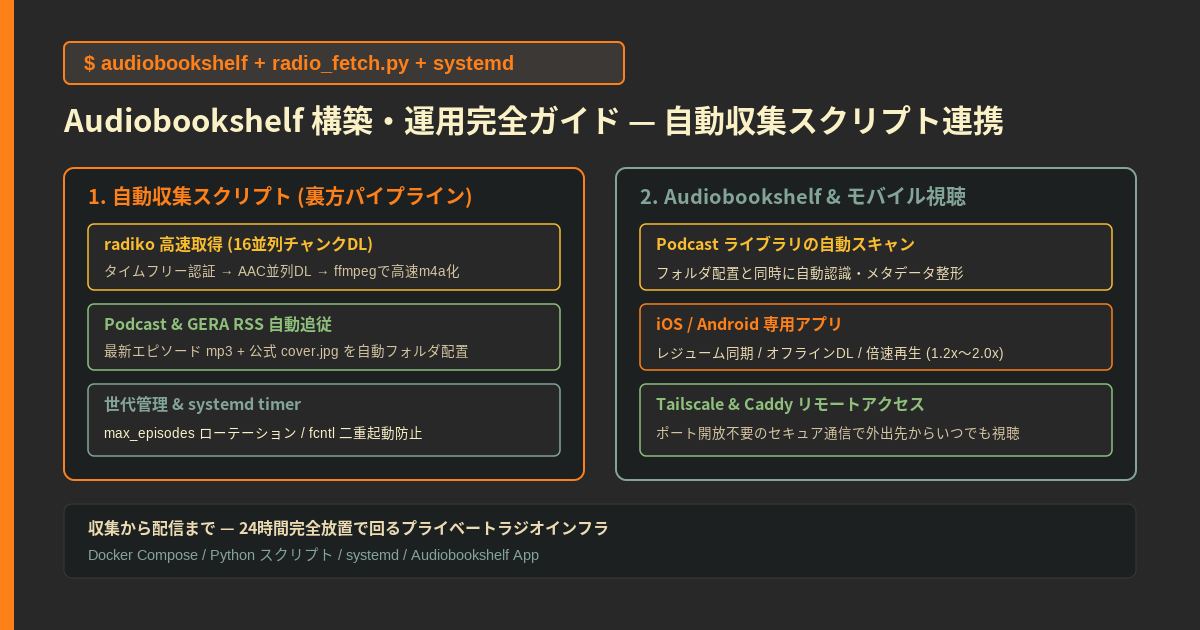
本稿では、Audiobookshelf の Docker Compose による構築手順にとどまらず、「裏方で radiko や各 Podcast から音源を自動収集し、カバー画像付きで整頓して Audiobookshelf に流し込む Python スクリプト」 の実装と systemd による完全自動化まで、手順を余すところなく細かく解説します。
1. 全体アーキテクチャとディレクトリ構造の設計
1.1 システム連携フロー
本システムは、「自動収集スクリプト(裏方)」 と 「Audiobookshelf + 公式アプリ(表側)」 の 2 つのレイヤーで構成されます。

1.2 Audiobookshelf が美しく認識するフォルダ命名規則
Audiobookshelf を「Podcast ライブラリ」モードで運用する場合、フォルダ構造を以下のように整えるのがベストプラクティスです。
/srv/radio/
├── radiko/
│   ├── 深夜ラジオA/
│   │   ├── cover.jpg                               # 番組カバー画像(正方形)
│   │   ├── 2026-10-27_深夜ラジオA.m4a              # シーク可能な単一音声
│   │   └── 2026-11-03_深夜ラジオA.m4a
│   └── 深夜ラジオB/
│       ├── cover.jpg
│       └── 2026-11-01_深夜ラジオB.m4a
└── podcasts/
    └── テック系ポッドキャスト/
        ├── cover.jpg
        ├── 2026-10-28_#120 最新技術動向.mp3
└── 2026-11-04_#121 アーキテクチャ解説.mp3- 番組フォルダ直下に
cover.jpg(またはcover.png)を置いておくと、Audiobookshelf が自動的に番組のアートワークとして読み込みます。 - 音声ファイル名に
YYYY-MM-DD_...の日付プレフィックスを付けておくことで、エピソードの公開日が正しく自動パースされます。
2. Audiobookshelf サーバーの構築(Docker Compose)
まずは土台となる Audiobookshelf サーバーを立ち上げます。
2.1 ディレクトリの準備
ホスト側で設定ファイル用・メタデータ用・音源用のディレクトリを作成します。
sudo mkdir -p /srv/audiobookshelf/{config,metadata}
sudo mkdir -p /srv/radio/{radiko,podcasts}

# ユーザー権限の設定(例: 一般ユーザー murabito (UID=1000, GID=1000) で統一)
sudo chown -R 1000:1000 /srv/audiobookshelf /srv/radio
2.2 compose.yaml の作成
/srv/audiobookshelf/compose.yaml を作成します。
services:
  audiobookshelf:
    image: ghcr.io/advplyr/audiobookshelf:latest
    container_name: audiobookshelf
    environment:
      - AUDIOBOOKSHELF_UID=1000
      - AUDIOBOOKSHELF_GID=1000
      - TZ=Asia/Tokyo
    ports:
      - "13378:80"
    volumes:
      - /srv/audiobookshelf/config:/config
      - /srv/audiobookshelf/metadata:/metadata
      - /srv/radio:/srv/radio:ro # 音源フォルダは読み取り専用で安全にマウント
restart: unless-stopped2.3 コンテナの起動
cd /srv/audiobookshelf
docker compose up -d
起動後、ブラウザから http://<サーバーのIPアドレス>:13378 にアクセスします。
初回アクセス時に管理者(Root)のユーザー名とパスワードを登録する画面が表示されるので、登録を済ませておきます。
3. 裏方自動収集スクリプトの作成
ここが本システムの核心です。音源を手動でダウンロードするのではなく、サーバー側で定期的に走るスクリプトを仕立てます。
必要な外部コマンド(ffmpeg)と Python ライブラリを確認します。
# Ubuntu / Debian の場合
sudo apt install -y python3 ffmpeg

# スクリプト格納用のディレクトリを作成
sudo mkdir -p /opt/radio-recorder
sudo mkdir -p /etc/radio-recorder
sudo mkdir -p /var/lib/radio-recorder
sudo chown -R 1000:1000 /opt/radio-recorder /etc/radio-recorder /var/lib/radio-recorder
3.1 radiko タイムフリー高速自動取得スクリプト (radiko_fetch.py)
通常、radiko のタイムフリーを 1 つずつダウンロードすると、2 時間の番組で数分〜10分近くかかります。 そこで、radiko の 300 秒(5分)ごとの AAC チャンクプレイリストを取得し、16 スレッドで並列ダウンロードした上で ffmpeg で無再エンコード(copy)結合する 高速スクリプトを構築します。これにより、2時間の深夜ラジオでも わずか数秒〜十数秒 で取得が完了します。
/opt/radio-recorder/radiko_fetch.py を作成します。
#!/usr/bin/env python3
"""
radiko タイムフリー高速並列ダウンローダー for Audiobookshelf
"""

import base64
import concurrent.futures
import datetime
import gzip
import json
import os
import re
import subprocess
import sys
import urllib.request
import uuid
import xml.etree.ElementTree as ET

CONFIG_FILE = "/etc/radio-recorder/radiko_rules.json"
STATE_FILE = "/var/lib/radio-recorder/radiko_state.json"
OUTPUT_BASE = "/srv/radio/radiko"
USER_AGENT = "Mozilla/5.0 (X11; Linux x86_64) AppleWebKit/537.36"
RADIKO_AUTHKEY = b"bcd151073c03b352e1ef2fd66c32209da9ca0afa"


def sanitize(name: str) -> str:
    return re.sub(r'[\\/:*?"<>|]+', "_", name).strip()


def radiko_authenticate(area_id: str = "JP13"):
    """radiko API の認証(AuthToken と PartialKey の生成)"""
    req1 = urllib.request.Request(
        "https://radiko.jp/v2/api/auth1",
        headers={
            "User-Agent": USER_AGENT,
            "X-Radiko-App": "pc_html5",
            "X-Radiko-App-Version": "0.0.1",
            "X-Radiko-User": "dummy_user",
            "X-Radiko-Device": "pc",
        },
    )
    with urllib.request.urlopen(req1, timeout=10) as res1:
        headers = dict(res1.getheaders())
        auth_token = headers.get("x-radiko-authtoken") or headers.get("X-Radiko-AuthToken")
        offset = int(headers.get("x-radiko-keyoffset") or headers.get("X-Radiko-KeyOffset"))
        length = int(headers.get("x-radiko-keylength") or headers.get("X-Radiko-KeyLength"))

    partial_key = base64.b64encode(RADIKO_AUTHKEY[offset : offset + length]).decode("ascii")

    req2 = urllib.request.Request(
        "https://radiko.jp/v2/api/auth2",
        headers={
            "User-Agent": USER_AGENT,
            "X-Radiko-App": "pc_html5",
            "X-Radiko-App-Version": "0.0.1",
            "X-Radiko-User": "dummy_user",
            "X-Radiko-Device": "pc",
            "X-Radiko-AuthToken": auth_token,
            "X-Radiko-PartialKey": partial_key,
        },
    )
    with urllib.request.urlopen(req2, timeout=10) as res2:
        pass

    return auth_token


def fetch_program_list(station: str, date_str: str):
    """指定放送局の日付別番組表 XML を取得"""
    url = f"https://radiko.jp/v3/program/date/{date_str}/{station}.xml"
    req = urllib.request.Request(url, headers={"User-Agent": USER_AGENT})
    try:
        with urllib.request.urlopen(req, timeout=10) as res:
            data = res.read()
            if data[:2] == b"\x1f\x8b":
                data = gzip.decompress(data)
            return ET.fromstring(data)
    except Exception as e:
        print(f"  [Warn] Failed to fetch program for {station} {date_str}: {e}")
        return None


def download_chunk(url: str, token: str) -> bytes:
    req = urllib.request.Request(url, headers={"User-Agent": USER_AGENT, "X-Radiko-AuthToken": token})
    with urllib.request.urlopen(req, timeout=15) as res:
        return res.read()


def record_timefree_program(station: str, ft: str, to: str, title: str, img_url: str, out_dir: str):
    """並列チャンクダウンロードを行い .m4a と cover.jpg を生成"""
    os.makedirs(out_dir, exist_ok=True)
    token = radiko_authenticate()

    # 1. 番組カバー画像の保存(cover.jpg が未存在の場合)
    cover_path = os.path.join(out_dir, "cover.jpg")
    if img_url and not os.path.exists(cover_path):
        try:
            req_img = urllib.request.Request(img_url, headers={"User-Agent": USER_AGENT})
            with urllib.request.urlopen(req_img, timeout=10) as r, open(cover_path, "wb") as f:
                f.write(r.read())
            print(f"  -> Saved cover artwork to {cover_path}")
        except Exception as e:
            print(f"  [Warn] Could not save cover image: {e}")

    # 2. タイムフリー m3u8 の取得
    playlist_url = (
        f"https://radiko.jp/v2/api/ts/playlist.m3u8?station_id={station}&l=15&ft={ft}&to={to}"
    )
    req_pl = urllib.request.Request(playlist_url, headers={"User-Agent": USER_AGENT, "X-Radiko-AuthToken": token})
    with urllib.request.urlopen(req_pl, timeout=10) as res:
        m3u8_text = res.read().decode("utf-8")

    chunk_urls = [line.strip() for line in m3u8_text.splitlines() if line.strip() and not line.startswith("#")]
    if not chunk_urls:
        print(f"  [Error] No chunks found in playlist for {title}")
        return False

    date_tag = ft[:8]
    formatted_date = f"{date_tag[:4]}-{date_tag[4:6]}-{date_tag[6:8]}"
    out_file = os.path.join(out_dir, f"{formatted_date}_{sanitize(title)}.m4a")

    if os.path.exists(out_file) and os.path.getsize(out_file) > 1000000:
        print(f"  -> Already downloaded: {out_file}")
        return True

    print(f"  -> Downloading {len(chunk_urls)} chunks in parallel (16 threads)...")
    temp_dir = f"/tmp/radiko_{uuid.uuid4().hex[:8]}"
    os.makedirs(temp_dir, exist_ok=True)

    try:
        # 16並列でダウンロード
        with concurrent.futures.ThreadPoolExecutor(max_workers=16) as executor:
            futures = {executor.submit(download_chunk, u, token): i for i, u in enumerate(chunk_urls)}
            for fut in concurrent.futures.as_completed(futures):
                idx = futures[fut]
                chunk_data = fut.result()
                with open(os.path.join(temp_dir, f"seg_{idx:05d}.aac"), "wb") as f:
                    f.write(chunk_data)

        # ffmpeg concat 用のリストファイル作成
        list_txt = os.path.join(temp_dir, "concat.txt")
        with open(list_txt, "w") as f:
            for i in range(len(chunk_urls)):
                f.write(f"file 'seg_{i:05d}.aac'\n")

        # ffmpeg で無劣化結合(シーク可能な m4a へ)
        cmd = [
            "ffmpeg", "-y", "-f", "concat", "-safe", "0", "-i", list_txt,
            "-c", "copy", "-movflags", "+faststart", out_file
        ]
        subprocess.run(cmd, stdout=subprocess.DEVNULL, stderr=subprocess.DEVNULL, check=True)
        print(f"  -> Successfully generated: {out_file} ({os.path.getsize(out_file) // 1024 // 1024} MB)")
        return True
    finally:
        # 一時ファイルの掃除
        subprocess.run(["rm", "-rf", temp_dir], check=False)


def purge_old_episodes(out_dir: str, max_episodes: int):
    """古いエピソードを削除してストレージを節約"""
    if max_episodes <= 0:
        return
    files = [
        os.path.join(out_dir, f) for f in os.listdir(out_dir)
        if f.endswith(".m4a") and not f.startswith(".")
    ]
    files.sort()
    if len(files) > max_episodes:
        to_delete = files[: len(files) - max_episodes]
        for f in to_delete:
            print(f"  [Purge] Deleting old episode: {os.path.basename(f)}")
            try:
                os.remove(f)
            except OSError:
                pass


def main():
    if not os.path.exists(CONFIG_FILE):
        print(f"Config file not found: {CONFIG_FILE}")
        return

    with open(CONFIG_FILE, "r", encoding="utf-8") as f:
        rules = json.load(f)

    # 過去3日分の番組表を探索(タイムフリー期間内)
    now = datetime.datetime.now()
    dates = [(now - datetime.timedelta(days=d)).strftime("%Y%m%d") for d in range(3)]

    for rule in rules:
        name = rule["name"]
        station = rule["station"]
        match_keywords = rule["match"]
        folder = os.path.join(OUTPUT_BASE, rule["folder"])
        max_episodes = rule.get("max_episodes", 2)

        print(f"\n[Checking Rule] {name} ({station})")
        found = False
        for d in dates:
            root = fetch_program_list(station, d)
            if root is None:
                continue

            for prog in root.findall(".//prog"):
                title = prog.findtext("title") or ""
                ft = prog.attrib.get("ft", "")
                to = prog.attrib.get("to", "")
                img = prog.findtext("img") or ""

                # キーワード合致チェック
                if any(k in title for k in match_keywords):
                    # 放送終了しているか確認
                    end_dt = datetime.datetime.strptime(to, "%Y%m%d%H%M%S")
                    if end_dt < now:
                        print(f"  Found finished broadcast: {title} ({ft} - {to})")
                        if record_timefree_program(station, ft, to, title, img, folder):
                            purge_old_episodes(folder, max_episodes)
                            found = True
                            break
            if found:
                break


if __name__ == "__main__":
    main()
設定ファイル: /etc/radio-recorder/radiko_rules.json
録音したい番組のキーワードと保存先フォルダ、保存エピソード数を JSON で定義します。
[
  {
    "name": "深夜ラジオA",
    "station": "TBS",
    "match": ["深夜ラジオA", "タイトル別表記"],
    "folder": "深夜ラジオA",
    "max_episodes": 2
  },
  {
    "name": "深夜ラジオB",
    "station": "LFR",
    "match": ["深夜ラジオB"],
    "folder": "深夜ラジオB",
    "max_episodes": 2
  },
  {
    "name": "トーク番組C",
    "station": "TBS",
    "match": ["トーク番組C"],
    "folder": "トーク番組C",
    "max_episodes": 3
  }
]
3.2 Podcast / GERA 自動収集スクリプト (podcast_fetch.py)
GERA や一般の Podcast RSS フィードから最新回を取得するスクリプトです。
/opt/radio-recorder/podcast_fetch.py を作成します。
#!/usr/bin/env python3
"""
Podcast & GERA RSS 自動ダウンローダー for Audiobookshelf
"""

import email.utils
import json
import os
import re
import urllib.request
import xml.etree.ElementTree as ET

CONFIG_FILE = "/etc/radio-recorder/podcast_shows.json"
OUTPUT_BASE = "/srv/radio/podcasts"
USER_AGENT = "Mozilla/5.0 (X11; Linux x86_64) AppleWebKit/537.36"


def sanitize(s: str) -> str:
    return re.sub(r'[\\/:*?"<>|]+', "_", s).strip()


def fetch_feed(url: str):
    req = urllib.request.Request(url, headers={"User-Agent": USER_AGENT})
    with urllib.request.urlopen(req, timeout=15) as res:
        return ET.fromstring(res.read())


def main():
    if not os.path.exists(CONFIG_FILE):
        return

    with open(CONFIG_FILE, "r", encoding="utf-8") as f:
        shows = json.load(f)

    for show in shows:
        name = show["name"]
        url = show["url"]
        folder = os.path.join(OUTPUT_BASE, show["folder"])
        max_items = show.get("max_items", 2)
        os.makedirs(folder, exist_ok=True)

        print(f"\n[Podcast] Checking {name}...")
        try:
            root = fetch_feed(url)
        except Exception as e:
            print(f"  [Error] Failed to fetch RSS: {e}")
            continue

        # 番組カバー画像の取得
        cover_path = os.path.join(folder, "cover.jpg")
        if not os.path.exists(cover_path):
            img_tag = root.find(".//channel/{http://www.itunes.com/dtds/podcast-1.0.dtd}image")
            img_url = img_tag.attrib.get("href") if img_tag is not None else None
            if not img_url:
                img_url = root.findtext(".//channel/image/url")

            if img_url:
                try:
                    req_img = urllib.request.Request(img_url, headers={"User-Agent": USER_AGENT})
                    with urllib.request.urlopen(req_img, timeout=10) as r, open(cover_path, "wb") as f:
                        f.write(r.read())
                    print(f"  -> Saved cover artwork to {cover_path}")
                except Exception as e:
                    print(f"  [Warn] Failed to save cover: {e}")

        # 最新エピソードの取得
        items = root.findall(".//channel/item")
        for item in items[:max_items]:
            title = item.findtext("title") or "Episode"
            pub_date = item.findtext("pubDate") or ""
            enclosure = item.find("enclosure")
            if enclosure is None:
                continue

            mp3_url = enclosure.attrib.get("url")
            if not mp3_url:
                continue

            # 日付パース
            dt_str = "1970-01-01"
            if pub_date:
                try:
                    parsed = email.utils.parsedate_to_datetime(pub_date)
                    dt_str = parsed.strftime("%Y-%m-%d")
                except Exception:
                    pass

            out_file = os.path.join(folder, f"{dt_str}_{sanitize(title)[:80]}.mp3")
            if os.path.exists(out_file) and os.path.getsize(out_file) > 100000:
                continue

            print(f"  -> Downloading: {os.path.basename(out_file)}")
            try:
                req_audio = urllib.request.Request(mp3_url, headers={"User-Agent": USER_AGENT})
                with urllib.request.urlopen(req_audio, timeout=60) as r, open(out_file, "wb") as f:
                    f.write(r.read())
                print(f"  -> Done ({os.path.getsize(out_file) // 1024 // 1024} MB)")
            except Exception as e:
                print(f"  [Error] Failed to download {mp3_url}: {e}")


if __name__ == "__main__":
    main()
設定ファイル: /etc/radio-recorder/podcast_shows.json
[
  {
    "name": "テック系ポッドキャスト",
    "folder": "テック系ポッドキャスト",
    "url": "https://example.com/podcast_tech_feed.xml",
    "max_items": 2
  },
  {
    "name": "カルチャーポッドキャスト",
    "folder": "カルチャーポッドキャスト",
    "url": "https://example.com/podcast_culture_feed.xml",
    "max_items": 2
  }
]
実行権限を付与します。
chmod +x /opt/radio-recorder/*.py4. systemd による完全自動化(Service & Timer)
cron よりもエラーハンドリングやログ調査が容易な systemd timer を設定します。
4.1 radiko タイムフリー取得ユニット
/etc/systemd/system/radiko-fetch.service を作成します。
[Unit]
Description=radiko TimeFree High-Speed Fetcher
After=network.target

[Service]
Type=oneshot
User=murabito
Group=murabito
ExecStart=/usr/bin/python3 /opt/radio-recorder/radiko_fetch.py
StandardOutput=journal
StandardError=journal
2時間おきに実行するタイマー /etc/systemd/system/radiko-fetch.timer を作成します。
[Unit]
Description=Run radiko-fetch every 2 hours

[Timer]
OnBootSec=5min
OnUnitActiveSec=2h
Persistent=true

[Install]
WantedBy=timers.target
4.2 タイマーの有効化と稼働確認
sudo systemctl daemon-reload
sudo systemctl enable --now radiko-fetch.timer

# タイマーの稼働状態を確認
systemctl list-timers | grep radiko
手動で一度即時実行してみて、正常に動作するか確認します。
sudo systemctl start radiko-fetch.service

# ログの確認
journalctl -u radiko-fetch.service -e指定したフォルダ(/srv/radio/radiko/<番組名>/)に cover.jpg と .m4a ファイルが生成されていれば大成功です!
5. Audiobookshelf の初期設定 & Podcast ライブラリ作成
音源が揃ったところで、Audiobookshelf 側の設定を行います。
5.1 Podcast ライブラリの追加
- ブラウザで
http://<IP>:13378を開き、ログインします。 - 左上のサーバー名メニューから 「Settings」(歯車アイコン)をクリックします。
- 「Libraries」 タブを開き、「Add Library」 をクリックします。
- 設定項目を以下のように入力します。
- Name:
Radio(またはPodcasts) - Media Type:
Podcasts(重要:BooksではなくPodcastsを選択) - Folder Path:
/srv/radio/radikoおよび/srv/radio/podcastsを選択
- Name:
- 「Save」 をクリックします。
5.2 反映結果の確認
ライブラリを開くと、スクリプトが保存した cover.jpg がそのまま美しい正方形のアートワークとして一覧表示されます。
各番組をクリックすると、日付順にエピソードが綺麗に並び、ブラウザ上からも即座に再生できます。
6. スマホ専用アプリでのリスニング環境構築
Audiobookshelf の最大の強みは、公式モバイルアプリ(iOS / Android)の出来栄えが極めて秀逸である点です。
6.1 アプリのインストールと接続
- App Store または Google Play から 「Audiobookshelf」 を検索してインストールします。
- アプリを起動し、サーバー URL(例:
http://192.168.11.122:13378、または後述の Tailscale アドレス)と、作成したユーザー名・パスワードを入力してログインします。
6.2 快適なリスニングのための推奨設定
アプリ右上のユーザー設定から、以下の設定を行っておくと快適度が跳ね上がります。
- 自動ダウンロード(Auto Download):
- 「Download New Episodes on Wi-Fi」をオンにしておくと、自宅の Wi-Fi に接続している間に未視聴の最新回が自動でスマホローカルにキャッシュされます。外出先で一切ギガ(通信量)を消費しません。
- 視聴済みエピソードの自動削除:
- 再生が完了したファイルをスマホから自動削除するように設定すれば、端末ストレージを圧迫しません。
- 再生速度とシーク秒数:
- トーク番組に最適な 1.2倍〜1.5倍速再生を設定。
- スキップボタンを「進む: 30秒」「戻る: 10秒」にしておくと、CM やオープニングをスムーズに飛ばせます。
7. 外出先から安全に聴くためのリモートアクセス(Tailscale)
自宅 LAN の外からアクセスするために、ルーターのポートを開放して生でインターネットに晒すのはセキュリティリスクがあります。
そこでおすすめなのが、メッシュ VPN サービス Tailscale です。
# サーバーに Tailscale を導入
curl -fsSL https://tailscale.com/install.sh | sh
sudo tailscale up
スマホにも Tailscale アプリを入れて同じアカウントでログインするだけで、http://100.x.y.z:13378 のようなプライベート IP、または MagicDNS(http://abs.your-tailnet.ts.net:13378)を使って、外出先から自宅の Audiobookshelf に安全に直結できます。
8. まとめ
本構成を一度組み上げてしまえば、日常のオペレーションは以下のようになります。
- 深夜ラジオや最新 Podcast が放送・配信される。
- サーバー側の Python スクリプト(systemd timer)が自動で音源とカバー画像を取得し、フォルダに整頓。
- Audiobookshelf がそれを自動検知してエピソード化。
- スマホが自宅 Wi-Fi に繋がっている間に自動でオフラインダウンロード。
- 朝の通勤・通学時、アプリを開くだけで最新のラジオがすでに手元に揃っている。
「録音ソフトを動かしているけれど聴くのが億劫になっていた」という方は、ぜひ Audiobookshelf と自動収集スクリプトを組み合わせて、最高に快適なパーソナルラジオ環境を構築してみてください!